
MQTT
Homecast publishes real-time device state to MQTT and accepts commands. Compatible with Home Assistant, Node-RED, and any MQTT client.
Connecting
| Setting | Value |
|---|---|
| Host | mqtt.homecast.cloud |
| Port | 8883 (TLS) or 1883 |
| Username | (leave blank) |
| Password | Your API access token (hc_...) |
Create an access token in Settings → API Access, or in the MQTT Browser → Connection Details.
Example
# Subscribe to all topics
mosquitto_sub -h mqtt.homecast.cloud -p 8883 \
  --cafile /etc/ssl/cert.pem \
  -u "" -P "hc_your_token_here" \
  -t "homecast/#" -v

# Turn off a light
mosquitto_pub -h mqtt.homecast.cloud -p 8883 \
  --cafile /etc/ssl/cert.pem \
  -u "" -P "hc_your_token_here" \
  -t "homecast/my-home-a1b2/living-room-c3d4/desk-lamp-e5f6/set" \
  -m '{"on": false}'
Topics
Follows the Zigbee2MQTT convention: the base topic is the device state, /set is for commands.
Device state
homecast/{home}/{room}/{accessory}Retained JSON with all characteristics, sorted alphabetically:
{"brightness": 80, "color_temp": 200, "on": true}Device commands
homecast/{home}/{room}/{accessory}/setPublish a JSON object with the characteristics to change:
{"on": false}
{"brightness": 50, "color_temp": 300}
Availability
homecast/{home}/{room}/{accessory}/availabilityRetained string: "online" or "offline".
Device info
homecast/{home}/{room}/{accessory}/infoRetained JSON describing what the accessory is, rather than its state. The state topic says an air conditioner has speed 100; this says that speed belongs to a heater_cooler service, that hvac_mode accepts 0, 1 and 2, and who made it:
{
  "category": "Other",
  "manufacturer": "Powrmatic",
  "model": "Default-Model",
  "keys": {
    "cool_target": {"service": "heater_cooler", "writable": true, "min": 16, "max": 31, "step": 1},
    "hvac_mode":   {"service": "heater_cooler", "writable": true, "min": 0, "max": 2, "step": 1, "valid": [0, 1, 2]},
    "speed":       {"service": "heater_cooler", "writable": true, "min": 0, "max": 100, "step": 1}
  }
}
Only keys the state topic publishes appear under keys. Any field may be missing — min, max, step and valid are there only when the accessory declares them.
Service groups
Groups control multiple devices at once (e.g., "All Kitchen Lights"):
homecast/{home}/{room}/{group}              # group state
homecast/{home}/{room}/{group}/set          # control all devices in group
homecast/{home}/{room}/{group}/members      # JSON array of member slugs
The default room
Apple Home keeps a default room that it doesn't list alongside the rooms you created, but accessories can sit in it. It publishes as default, slugged like any other room:
homecast/{home}/default-{hex}/{accessory}Accessories with no room
A virtual accessory belongs to the home rather than to any part of it, so it has no room segment at all. Everything else about it is unchanged:
homecast/{home}/{accessory}                 # device state
homecast/{home}/{accessory}/set             # commands
homecast/{home}/{accessory}/availability    # online/offline
A group whose members are all roomless publishes the same way.
Scenes
homecast/{home}/scene/{scene}/executePublish any payload to trigger the scene.
Home status
homecast/{home}/statusRetained: "online" or "offline". Updated via MQTT Last Will and Testament.
Home Assistant auto-discovery
homeassistant/{component}/homecast_{id}/configRetained JSON with HA discovery payload. Published automatically when MQTT is enabled. Devices appear in Home Assistant without manual configuration.
Virtual accessories are the exception: a Switch is discovered like any other switch, but the other types have no Home Assistant equivalent to be discovered as. Subscribe to their topics directly, or use the Home Assistant integration.
Slugs
Topic segments use the format {name}-{first 4 hex of UUID}:
county-hall-2d10(home)kitchen-dfee(room)default-1910(the default room — nameddefaultrather than after itself, whose name Apple localizes, but slugged the same way)desk-lamp-e5f6(accessory)kitchen-lights-182f(service group)
Slugs are stable — renaming a device in HomeKit doesn't change the slug.
Editions
| Feature | Community | Cloud |
|---|---|---|
| Custom MQTT brokers | Connect Mac app to your broker | Store in DB, cloud bridge connects |
Homecast Broker (mqtt.homecast.cloud) | Not available | Per-home toggle in Settings |
| MQTT Browser | At homecast.cloud/mqtt | Also at mqtt.homecast.cloud |
| HA auto-discovery | Published by Mac app | Published by cloud bridge |
| Service group support | Via Mac app | Via cloud bridge |
MQTT Browser
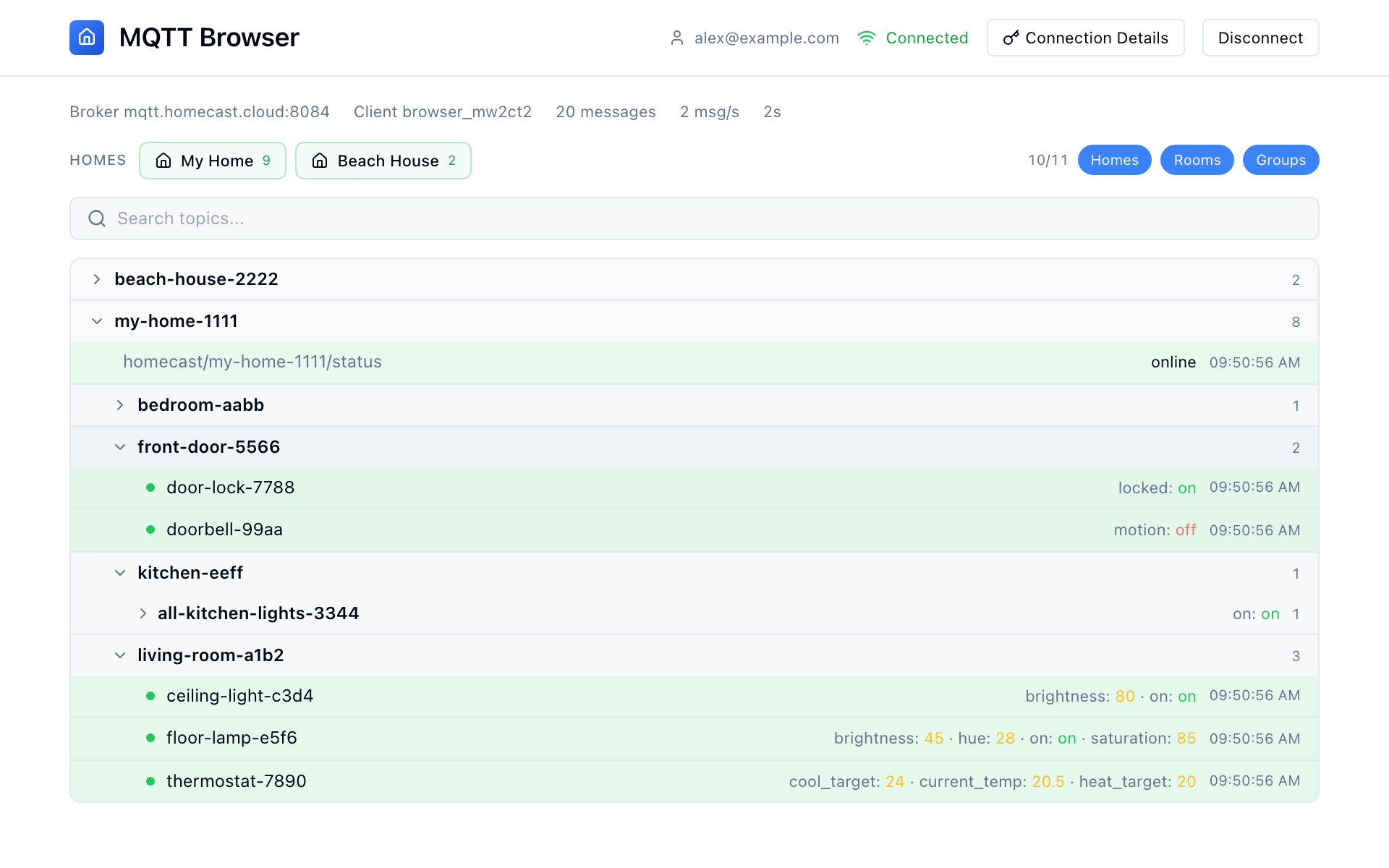
Browse live device state and publish commands at mqtt.homecast.cloud or homecast.cloud/mqtt.
Features:
- Auto-connects with your Homecast session
- Filter by home and room
- Visual controls: toggles for booleans, sliders for brightness/color
- Raw JSON editor for advanced use
- Publish history
- Service group support with member list
- Connection details dialog with access token management
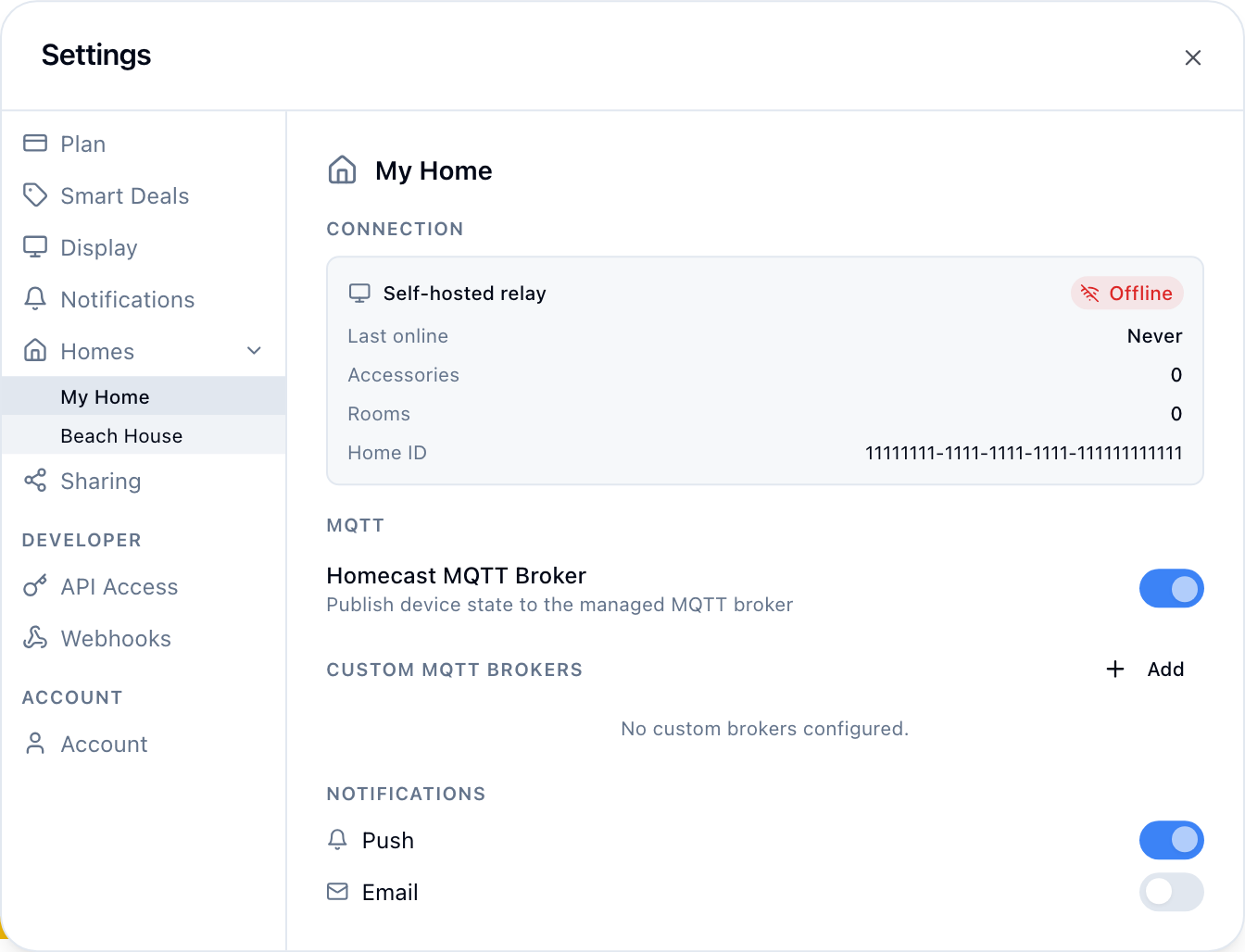
Enabling MQTT
- Go to Settings → Account → enable Developer Mode
- Go to Settings → Homes → click your home
- Toggle Homecast Broker on
- (Optional) Add custom brokers below
Characteristic names
MQTT uses simplified names for HomeKit characteristics:
| MQTT name | HomeKit characteristic |
|---|---|
on | Power state |
brightness | Brightness (0–100) |
color_temp | Color temperature (50–500) |
hue | Hue (0–360) |
saturation | Saturation (0–100) |
current_temp | Current temperature |
heat_target | Heating threshold |
cool_target | Cooling threshold |
position | Current position (blinds, 0–100) |
target | Target position |
locked | Lock state |
lock_target | Lock target |
motion | Motion detected |
contact | Contact sensor state |
speed | Fan rotation speed |
volume | Speaker volume |
mute | Mute state |
battery | Battery level |
active | Active state |
alarm_state | Security system state |
alarm_target | Security system target |
hvac_mode | Heater/cooler target mode: 0 auto, 1 heat, 2 cool. /set also takes "auto", "heat", "cool" |
hvac_state | Heater/cooler current state: 0 inactive, 1 idle, 2 heating, 3 cooling |
swing_mode | Heater/cooler swing: 0 off, 1 on |
target_temp | Thermostat target temperature |
thermostat_mode | Thermostat target mode: 0 off, 1 heat, 2 cool, 3 auto |
thermostat_state | Thermostat current state: 0 off, 1 heating, 2 cooling |
relative_humidity | Current relative humidity |
position_state | Covering motion: 0 closing, 1 opening, 2 stopped |
obstruction | Obstruction detected |
low_battery | Low battery status |
An air conditioner is a heater/cooler, not a thermostat: HomeKit gives the two different mode numbering, which is why they publish under different names.
Virtual accessories
Virtual accessories publish and accept commands like any other device. They have no room, so they sit directly under the home (see Accessories with no room).
Each carries one key, and what writing to it means depends on the type:
| Type | API type | MQTT key | Publishing to /set |
|---|---|---|---|
| Switch | input_boolean | on | true / false |
| Mode | input_select | mode | selects that option |
| Counter | counter | count | sets the count — it does not add to it |
| Number | input_number | number | sets the value |
| Text | input_text | text | sets the text |
| Date & time | input_datetime | datetime | sets it, same format the dashboard stores |
| Timer | timer | timer | "active" starts it; anything else cancels it |
# Switch a mode
mosquitto_pub -t "homecast/my-home-a1b2/home-mode-80d9/set" -m '{"mode": "Away"}'

# Start a timer
mosquitto_pub -t "homecast/my-home-a1b2/porch-timer-2c12/set" -m '{"timer": "active"}'
Timers
A timer's state is idle, active or paused. On its own that only says whether it is running, so it publishes the countdown alongside:
| Key | Meaning |
|---|---|
timer_started_at | when the current run started |
timer_ends_at | when it will run out |
timer_duration_ms | how long it runs for |
timer_finished_at | when it last ran out — stays until the next start |
{"timer": "active", "timer_started_at": 1754563200000, "timer_ends_at": 1754563500000, "timer_duration_ms": 300000}Times are absolute (epoch milliseconds) rather than a remaining span, because a retained message is read long after it was published — work out the remaining time from timer_ends_at at the moment you need it.
timer_finished_at is there because an idle timer is otherwise indistinguishable from one that has never run. Cancelling a timer does not set it: a cancelled timer never finished.