
GraphQL API
Endpoint: GET/POST https://api.homecast.cloud/graphql
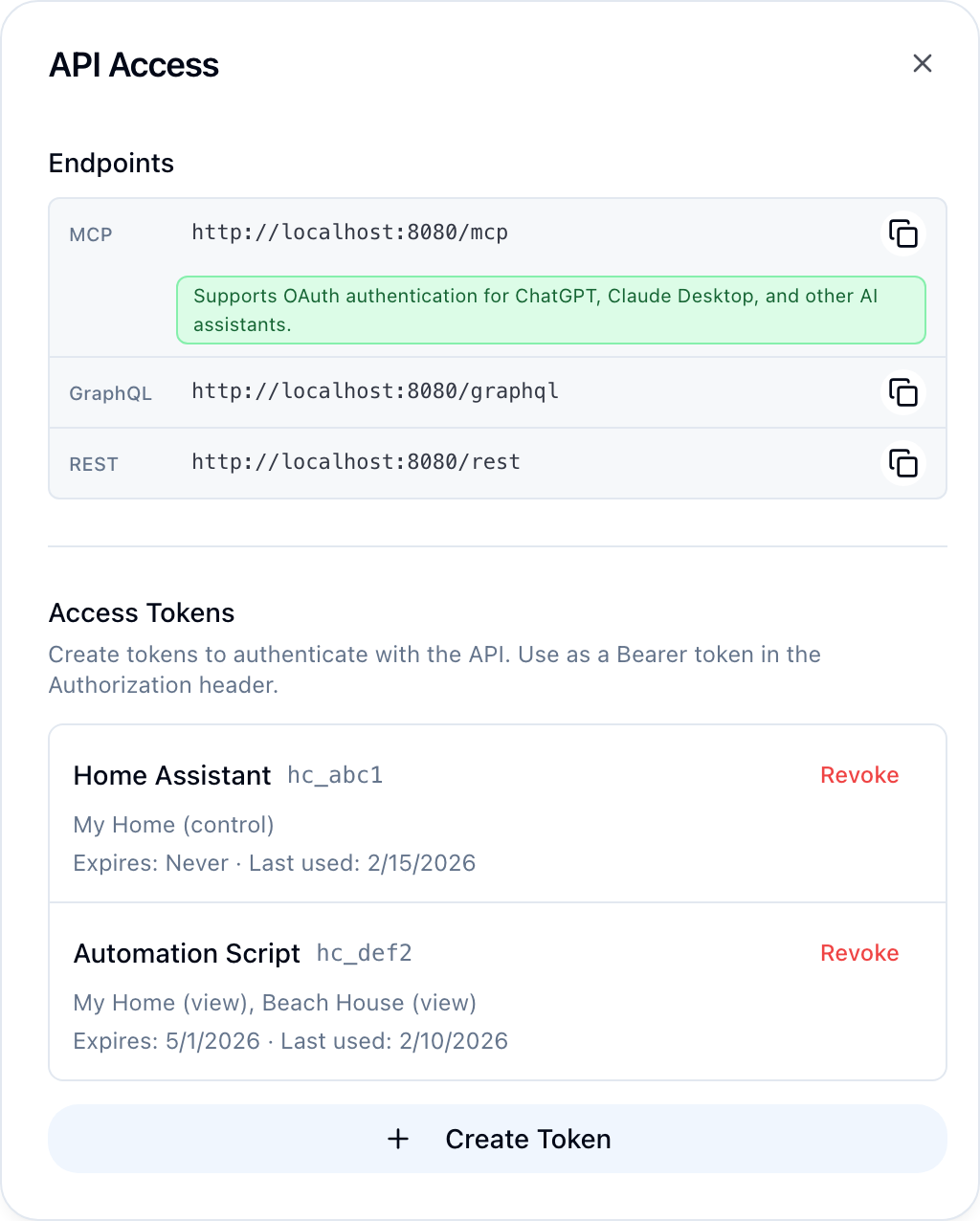
Authenticate with an access token (hc_...) or OAuth Bearer token. Enable Developer Mode in Settings → Account, then find your endpoints in Settings → API Access.
curl -X POST https://api.homecast.cloud/graphql \
  -H "Authorization: Bearer hc_your_token" \
  -H "Content-Type: application/json" \
  -d '{"query": "{ homes { id name } }"}'
Field name convention
All field names are camelCase in GraphQL (e.g., accessTokens, homeId).
Homes & Rooms
Queries
| Field | Parameters | Returns | Description |
|---|---|---|---|
homes | — | [HomeKitHome] | All accessible homes |
cachedHomes | — | [CachedHome] | Cached homes with relay status |
rooms | homeId | [HomeKitRoom] | Rooms in a home |
zones | homeId | [HomeKitZone] | Zones in a home |
serviceGroups | homeId | [HomeKitServiceGroup] | Service groups |
scenes | homeId | [HomeKitScene] | Scenes in a home |
Types
type HomeKitHome {
  id: String!
  name: String!
  role: String       # owner, admin, control, view
}

type CachedHome {
  homeId: String!
  name: String!
  role: String
  isConnected: Boolean
  memberCount: Int
}

type HomeKitRoom {
  id: String!
  name: String!
  homeId: String!
}

type HomeKitScene {
  id: String!
  name: String!
  homeId: String!
}
Accessories & Control
Queries
| Field | Parameters | Returns | Description |
|---|---|---|---|
accessories | homeId?, roomId? | [HomeKitAccessory] | List accessories |
accessory | accessoryId, homeId? | HomeKitAccessory | Get single accessory |
characteristicGet | accessoryId, characteristicType, homeId? | CharacteristicValue | Read a characteristic |
Mutations
| Field | Parameters | Returns | Description |
|---|---|---|---|
setCharacteristic | accessoryId, characteristicType, value, homeId? | SetCharacteristicResult | Set a device characteristic |
setServiceGroup | homeId, groupId, characteristicType, value | SetServiceGroupResult | Control all devices in a group |
executeScene | sceneId, homeId? | ExecuteSceneResult | Execute a HomeKit scene |
Types
type HomeKitAccessory {
  id: String!
  name: String!
  homeId: String!
  roomId: String!
  category: String
  reachable: Boolean!
  services: [HomeKitService!]!
}

type HomeKitService {
  id: String!
  type: String!
  name: String
  characteristics: [HomeKitCharacteristic!]!
}

type HomeKitCharacteristic {
  type: String!
  value: JSON
  description: String
  format: String
  unit: String
  minValue: Float
  maxValue: Float
  minStep: Float
  validValues: [String]
  canRead: Boolean!
  canWrite: Boolean!
}

type SetCharacteristicResult {
  success: Boolean!
  value: JSON
  error: String
}
Automations
Manage HomeKit automations — time-based triggers, device state events, sunrise/sunset, and more. Automations sync bidirectionally with the Apple Home app.
Relay needs Apple Home edit access
Creating, updating, or deleting automations requires the relay Mac's Apple ID to have edit access in Apple Home ("Add & Edit Accessories", called "Allow Editing" on older iOS). Without it, mutations fail with an Insufficient privileges error — see Troubleshooting.
Queries
| Field | Parameters | Returns | Description |
|---|---|---|---|
automations | homeId | [HomeKitAutomation] | List automations in a home |
Mutations
| Field | Parameters | Returns | Description |
|---|---|---|---|
createAutomation | homeId, name, trigger (JSON), actions (JSON) | HomeKitAutomation | Create a new automation |
updateAutomation | automationId, homeId?, name?, trigger? (JSON), actions? (JSON), enabled? | HomeKitAutomation | Update an automation |
deleteAutomation | automationId, homeId? | AutomationResult | Delete an automation |
setAutomationEnabled | automationId, enabled, homeId? | HomeKitAutomation | Enable or disable |
Types
type HomeKitAutomation {
  id: String!
  name: String!
  isEnabled: Boolean!
  trigger: AutomationTrigger!
  actions: [AutomationAction!]!
  lastFireDate: String
  homeId: String
}

type AutomationTrigger {
  type: String!          # "timer" or "event"
  fireDate: String       # ISO8601 (timer)
  recurrence: String     # JSON-encoded DateComponents (timer)
  timeZone: String       # IANA timezone (timer)
  events: [AutomationEvent!]     # Events that activate the trigger
  endEvents: [AutomationEvent!]  # Events that deactivate (e.g., motion stops)
  recurrences: String            # JSON-encoded array of DateComponents
  executeOnce: Boolean           # Fire once then disable
  activationState: String        # enabled, disabled, disabledNoHomeHub, etc.
}

type AutomationEvent {
  type: String!          # "characteristic", "significantTime", "location", etc.
  accessoryId: String
  accessoryName: String
  characteristicType: String
  triggerValue: String   # JSON-encoded
  significantEvent: String  # "sunrise" or "sunset"
  offsetMinutes: Int
  # Location fields
  latitude: Float
  longitude: Float
  radius: Float
  # Presence fields
  presenceType: String
  presenceEvent: String
}

type AutomationAction {
  accessoryId: String!
  accessoryName: String!
  characteristicType: String!
  targetValue: String    # JSON-encoded
}

type AutomationResult {
  success: Boolean!
  automationId: String!
  error: String
}
JSON string parameters
The trigger and actions parameters in mutations are JSON strings, not objects. Serialize them with JSON.stringify() before passing.
Access Tokens
Queries
| Field | Parameters | Returns | Description |
|---|---|---|---|
accessTokens | — | [AccessTokenInfo] | List all tokens |
Mutations
| Field | Parameters | Returns | Description |
|---|---|---|---|
createAccessToken | name, homePermissions, expiresAt? | CreateAccessTokenResult | Create a token |
revokeAccessToken | tokenId | RevokeAccessTokenResult | Revoke a token |
Webhooks
Queries
| Field | Parameters | Returns | Description |
|---|---|---|---|
webhooks | — | [WebhookInfo] | List all webhooks |
webhook | webhookId | WebhookInfo | Get single webhook |
webhookEventTypes | — | [WebhookEventTypeInfo] | Available event types |
webhookDeliveryHistory | webhookId, offset?, limit? | DeliveryHistoryResult | Delivery history |
Mutations
| Field | Parameters | Returns | Description |
|---|---|---|---|
createWebhook | name, url, eventTypes?, homeIds?, roomIds?, accessoryIds?, collectionIds?, maxRetries?, rateLimitPerMinute?, timeoutMs? | CreateWebhookResult | Create a webhook |
updateWebhook | webhookId, name?, url?, eventTypes?, homeIds?, roomIds?, accessoryIds?, collectionIds?, maxRetries?, rateLimitPerMinute?, timeoutMs? | UpdateWebhookResult | Update a webhook |
deleteWebhook | webhookId | DeleteWebhookResult | Delete a webhook |
pauseWebhook | webhookId | UpdateWebhookResult | Pause deliveries |
resumeWebhook | webhookId | UpdateWebhookResult | Resume deliveries |
rotateWebhookSecret | webhookId | RotateSecretResult | Rotate signing secret |
testWebhook | webhookId | TestWebhookResult | Send test delivery |
Types
type WebhookInfo {
  id: String!
  name: String!
  url: String!
  secretPrefix: String!
  status: String!           # active, paused, disabled
  eventTypes: [String!]!
  homeIds: [String!]!
  roomIds: [String!]!
  accessoryIds: [String!]!
  collectionIds: [String!]!
  maxRetries: Int!
  rateLimitPerMinute: Int
  timeoutMs: Int!
  consecutiveFailures: Int!
  lastTriggeredAt: String
  lastSuccessAt: String
  lastFailureAt: String
  createdAt: String
}
OAuth Apps
Queries
| Field | Parameters | Returns | Description |
|---|---|---|---|
authorizedApps | — | [AuthorizedAppInfo] | OAuth apps with access |
Mutations
| Field | Parameters | Returns | Description |
|---|---|---|---|
revokeAuthorizedApp | clientId | RevokeAuthorizedAppResult | Revoke app access |
Examples
Read all accessories in a home
{
  homes {
    id
    name
    rooms {
      id
      name
      accessories {
        id
        name
        category
        reachable
        services {
          type
          characteristics {
            type
            value
          }
        }
      }
    }
  }
}
Set a device characteristic
mutation {
  setCharacteristic(
    accessoryId: "acc-uuid"
    characteristicType: "brightness"
    value: "50"
    homeId: "home-uuid"
  ) {
    success
    value
    error
  }
}
Create an access token
mutation {
  createAccessToken(
    name: "My Script"
    homePermissions: "{\"home-uuid\": \"control\"}"
  ) {
    success
    rawToken
    error
  }
}
Create a webhook
mutation {
  createWebhook(
    name: "State logger"
    url: "https://my-server.com/webhook"
    eventTypes: ["state.changed"]
    homeIds: ["home-uuid"]
  ) {
    success
    webhook {
      id
      name
      secretPrefix
    }
    error
  }
}
Push Notifications
Manage push notification tokens, preferences, and view notification history. Cloud plan only.
Queries
| Field | Parameters | Returns | Description |
|---|---|---|---|
pushTokens | — | [PushTokenInfo] | List registered push notification devices |
notificationPreferences | — | [NotificationPreferenceInfo] | List all notification preferences (global, per-home, per-automation) |
notificationHistory | limit, offset, automationId | [NotificationLogInfo] | Notification delivery history (30-day retention) |
Mutations
| Field | Parameters | Returns | Description |
|---|---|---|---|
registerPushToken | token!, platform!, deviceFingerprint!, deviceName | RegisterPushTokenResult | Register or update an FCM/APNs push token |
unregisterPushToken | deviceFingerprint! | Boolean | Remove a push token |
setNotificationPreference | scope!, scopeId, pushEnabled!, emailEnabled!, localEnabled! | SetNotificationPreferenceResult | Set notification preferences at a scope |
deleteNotificationPreference | scope!, scopeId | Boolean | Delete a preference override (revert to parent scope) |
sendTestNotification | message | Boolean | Send a test notification to all your devices |
Types
type PushTokenInfo {
  id: String!
  platform: String!           # "web", "macos", "ios"
  deviceName: String
  deviceFingerprint: String!
  createdAt: String!
  lastUsedAt: String
}

type NotificationPreferenceInfo {
  id: String!
  scope: String!              # "global", "home", "automation"
  scopeId: String             # null for global, home/automation ID otherwise
  pushEnabled: Boolean!
  emailEnabled: Boolean!
  localEnabled: Boolean!
}

type NotificationLogInfo {
  id: String!
  automationId: String
  homeId: String
  title: String
  message: String!
  channelsSent: String!       # comma-separated: "push", "email", "push,email"
  channelsFailed: String
  rateLimited: Boolean!
  createdAt: String!
}
Preference resolution
Preferences follow a hierarchy — the most specific scope wins:
- Automation (
scope: "automation",scopeId: "<automationId>") - Home (
scope: "home",scopeId: "<homeId>") - Global (
scope: "global",scopeId: null) - Defaults — push: on, email: off, local: on
Example
mutation {
  registerPushToken(
    token: "fcm-token-here"
    platform: "web"
    deviceFingerprint: "browser-uuid"
    deviceName: "Chrome on macOS"
  ) {
    success
    error
  }
}
See API Errors for error response formats and common issues.