
REST API
The REST API provides a simplified interface for reading device state, controlling devices, and running scenes. Authenticate with an access token (hc_...) or OAuth Bearer token.
Base URL: https://api.homecast.cloud/rest (Cloud) or http://your-mac.local:5656/rest (Community)
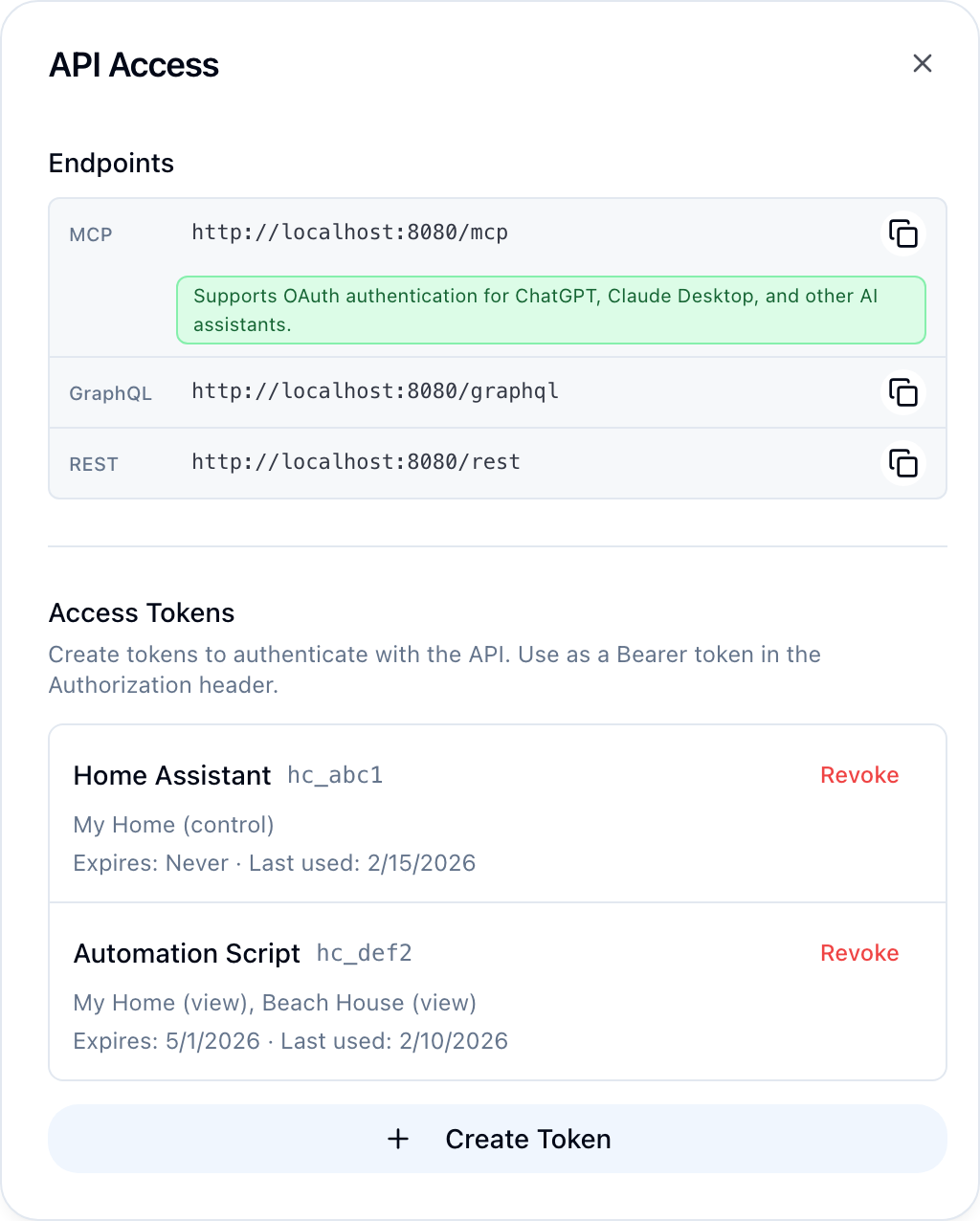
Enable Developer Mode in Settings → Account, then find your API endpoints and tokens in Settings → API Access.
GET /rest/state
Read the current state of all accessible homes in a simplified, flat format.
curl https://api.homecast.cloud/rest/state \
  -H "Authorization: Bearer hc_your_token"
Query parameters
| Parameter | Type | Description |
|---|---|---|
home | string | Filter by home name substring |
room | string | Filter by room name substring |
type | string | Filter by device type (light, switch, climate, lock, alarm, fan, blind, valve, speaker, motion, contact, temperature, outlet, light_sensor, camera, doorbell, button) |
name | string | Filter by accessory name substring |
Virtual accessories are returned alongside your HomeKit devices and are read and written the same way. Their types are input_boolean (Switch), input_select (Mode), counter, timer, input_number, input_text and input_datetime.
Example with filters:
curl "https://api.homecast.cloud/rest/state?type=light&room=bedroom" \
  -H "Authorization: Bearer hc_your_token"
Response
The response is a nested dictionary keyed by slug keys: home_key → room_key → accessory_key → properties.
{
  "my_home_a1b2": {
    "living_room_c3d4": {
      "floor_lamp_e5f6": {
        "type": "light",
        "on": true,
        "brightness": 75,
        "color_temp": 366,
        "_settable": ["on", "brightness", "color_temp"],
        "name": "my_home_a1b2.living_room_c3d4.floor_lamp_e5f6"
      },
      "thermostat_g7h8": {
        "type": "climate",
        "current_temp": 21.5,
        "heat_target": 22.0,
        "active": true,
        "_settable": ["heat_target", "active"],
        "name": "my_home_a1b2.living_room_c3d4.thermostat_g7h8"
      }
    },
    "_scenes": ["Good Morning", "Good Night", "Leave Home"]
  },
  "_homes": {
    "my_home_a1b2": "HOME-UUID-HERE"
  },
  "_meta": {
    "fetched_at": "2026-04-05T10:30:00+00:00",
    "message": "Found 15 accessories across 1 home"
  }
}
Slug keys are generated from the name + last 4 chars of UUID: living_room_c3d4. Use these keys with POST /rest/state and POST /rest/scene.
_settable lists which properties you can write for that accessory.
_scenes lists available scene names per home (use with POST /rest/scene).
Service groups (light groups, multi-switches) appear with "group": true and an "accessories" dict containing member states.
POST /rest/state
Control devices. Send a nested dict of home → room → accessory → settings.
curl -X POST https://api.homecast.cloud/rest/state \
  -H "Authorization: Bearer hc_your_token" \
  -H "Content-Type: application/json" \
  -d '{
    "my_home_a1b2": {
      "living_room_c3d4": {
        "floor_lamp_e5f6": {
          "on": true,
          "brightness": 80
        }
      }
    }
  }'
Use the slug keys from GET /rest/state. You can update multiple accessories across multiple homes in a single request.
Settable properties
Virtual accessories are set the same way, using the characteristic GET /rest/state reports for them: virtual_mode, virtual_count (which sets the count rather than adding to it), virtual_number, virtual_text, virtual_datetime, and virtual_timer ("active" starts it, anything else cancels it). A virtual Switch uses on.
| Property | Type | Description |
|---|---|---|
on | boolean | Power state |
brightness | integer | Brightness 0–100 |
hue | integer | Color hue 0–360 |
saturation | integer | Color saturation 0–100 |
color_temp | integer | Color temperature in mireds (140–500) |
active | boolean | Active state (climate, air purifiers) |
heat_target | float | Heating target temperature |
cool_target | float | Cooling target temperature |
hvac_mode | string | auto, heat, or cool |
lock_target | boolean | true to lock, false to unlock |
alarm_target | string | home, away, night, or off |
speed | integer | Fan speed 0–100 |
volume | integer | Speaker volume 0–100 |
mute | boolean | Speaker mute |
target | integer | Target position 0–100 (blinds, garage doors) |
Response
{
  "updated": 1,
  "failed": 0,
  "changes": ["my_home_a1b2/living_room_c3d4/floor_lamp_e5f6: on=true, brightness=80"],
  "errors": [],
  "message": "Updated 1 accessory"
}
POST /rest/scene
Execute a HomeKit scene by name.
curl -X POST https://api.homecast.cloud/rest/scene \
  -H "Authorization: Bearer hc_your_token" \
  -H "Content-Type: application/json" \
  -d '{"home": "my_home_a1b2", "name": "Good Night"}'
Request body
| Field | Type | Required | Description |
|---|---|---|---|
home | string | Yes | Home slug key (from _homes in state response) |
name | string | Yes | Scene name (from _scenes in state response) |
Response
{ "success": true }GET /rest/homes
List all homes accessible to the authenticated user.
curl https://api.homecast.cloud/rest/homes \
  -H "Authorization: Bearer hc_your_token"
Response
[
  {
    "id": "HOME-UUID",
    "name": "My Home",
    "key": "my_home_a1b2",
    "connected": true
  }
]
GET /rest/accessories
List accessories with optional filters.
curl "https://api.homecast.cloud/rest/accessories?home=HOME_ID&room=ROOM_ID" \
  -H "Authorization: Bearer hc_your_token"
Query parameters
| Parameter | Type | Description |
|---|---|---|
home | string | Home UUID to filter by |
room | string | Room UUID to filter by |
type | string | Accessory type to filter by |
name | string | Accessory name substring to filter by |
Response
Returns the full accessory list with complete service/characteristic details — your HomeKit devices, plus any virtual accessories, which carry isVirtual: true and a virtualType.
GET /rest/accessories/:id
Get a single accessory by UUID.
curl https://api.homecast.cloud/rest/accessories/ACC-UUID \
  -H "Authorization: Bearer hc_your_token"
GET /rest/rooms
List rooms in a home.
curl "https://api.homecast.cloud/rest/rooms?home=HOME_ID" \
  -H "Authorization: Bearer hc_your_token"
GET /rest/history
Recorded history for one accessory (requires Analytics to be enabled for the home — it is opt-in and off by default). Numeric characteristics return [isoTime, value] pairs with a min/avg/max summary; on/off and mode characteristics return [isoTime, state] transitions.
curl "https://api.homecast.cloud/rest/history?accessory=living%20room&hours=24" \
  -H "Authorization: Bearer hc_your_token"
Query parameters
| Parameter | Description |
|---|---|
accessory | Accessory name substring, slug, or id (required) |
home | Home name substring — narrows the search |
characteristic | One characteristic (e.g. current_temperature). Omit for all recordable ones (up to 6) |
hours | How far back to look (default 24) |
max_points | Maximum points per series (default 200) |
GET /rest/scenes
List scenes in a home.
curl "https://api.homecast.cloud/rest/scenes?home=HOME_ID" \
  -H "Authorization: Bearer hc_your_token"
POST /rest/scenes
Create a scene. actions uses accessory UUIDs and HomeKit characteristic types (both returned by GET /rest/accessories).
curl -X POST https://api.homecast.cloud/rest/scenes \
  -H "Authorization: Bearer hc_your_token" \
  -H "Content-Type: application/json" \
  -d '{
    "homeId": "HOME-UUID",
    "name": "Movie Night",
    "actions": [
      { "accessoryId": "ACCESSORY-UUID", "characteristicType": "public.hap.characteristic.brightness", "targetValue": 20 }
    ]
  }'
Scene names must end with a letter or number. Requires a relay app version with scene management support.
PATCH /rest/scenes/:id
Rename a scene and/or replace all of its actions. Pass name, actions, or both (same actions format as create). Built-in scenes and scenes owned by an automation cannot be modified.
curl -X PATCH https://api.homecast.cloud/rest/scenes/SCENE-UUID \
  -H "Authorization: Bearer hc_your_token" \
  -H "Content-Type: application/json" \
  -d '{ "name": "Movie Time" }'
POST /rest/scenes/:id/execute
Execute a scene by UUID (alternative to POST /rest/scene).
curl -X POST https://api.homecast.cloud/rest/scenes/SCENE-UUID/execute \
  -H "Authorization: Bearer hc_your_token"
Response
{ "success": true }DELETE /rest/scenes/:id
Permanently delete a scene by UUID. Built-in scenes and scenes owned by an automation cannot be deleted (the error names the automation — delete that instead).
curl -X DELETE https://api.homecast.cloud/rest/scenes/SCENE-UUID \
  -H "Authorization: Bearer hc_your_token"
Background endpoints
Manage dashboard background images (Cloud edition only).
GET /rest/background/presets
List available preset background images.
curl https://api.homecast.cloud/rest/background/presets \
  -H "Authorization: Bearer hc_your_token"
POST /rest/background
Upload a custom background image. Content-Type: multipart/form-data
curl -X POST https://api.homecast.cloud/rest/background \
  -H "Authorization: Bearer hc_your_token" \
  -F "file=@background.jpg"
DELETE /rest/background
Delete a background image. Pass filename as a query parameter.
curl -X DELETE "https://api.homecast.cloud/rest/background?filename=background.jpg" \
  -H "Authorization: Bearer hc_your_token"
Error responses
All REST errors return JSON with an error field:
{ "error": "Scene 'Good Night' not found in home 'My Home'" }| Status | Meaning |
|---|---|
| 401 | Authentication required or token invalid |
| 400 | Invalid request body |
| 404 | Unknown endpoint |
| 500 | Server error |
See API Errors for common errors and troubleshooting.