
MCP
Homecast provides an MCP endpoint that AI assistants use to read and control smart home devices.
Endpoint: https://api.homecast.cloud/mcp
Transport: Streamable HTTP (GET, POST, DELETE)
Authentication
MCP supports two authentication methods:
| Method | Setup | Best for |
|---|---|---|
| OAuth 2.1 | Auto-discovered via /.well-known/oauth-authorization-server | MCP clients with OAuth support (Claude Desktop, etc.) |
| Access Token | Authorization: Bearer hc_... header | Clients without OAuth |
See the Authentication reference for details on both.
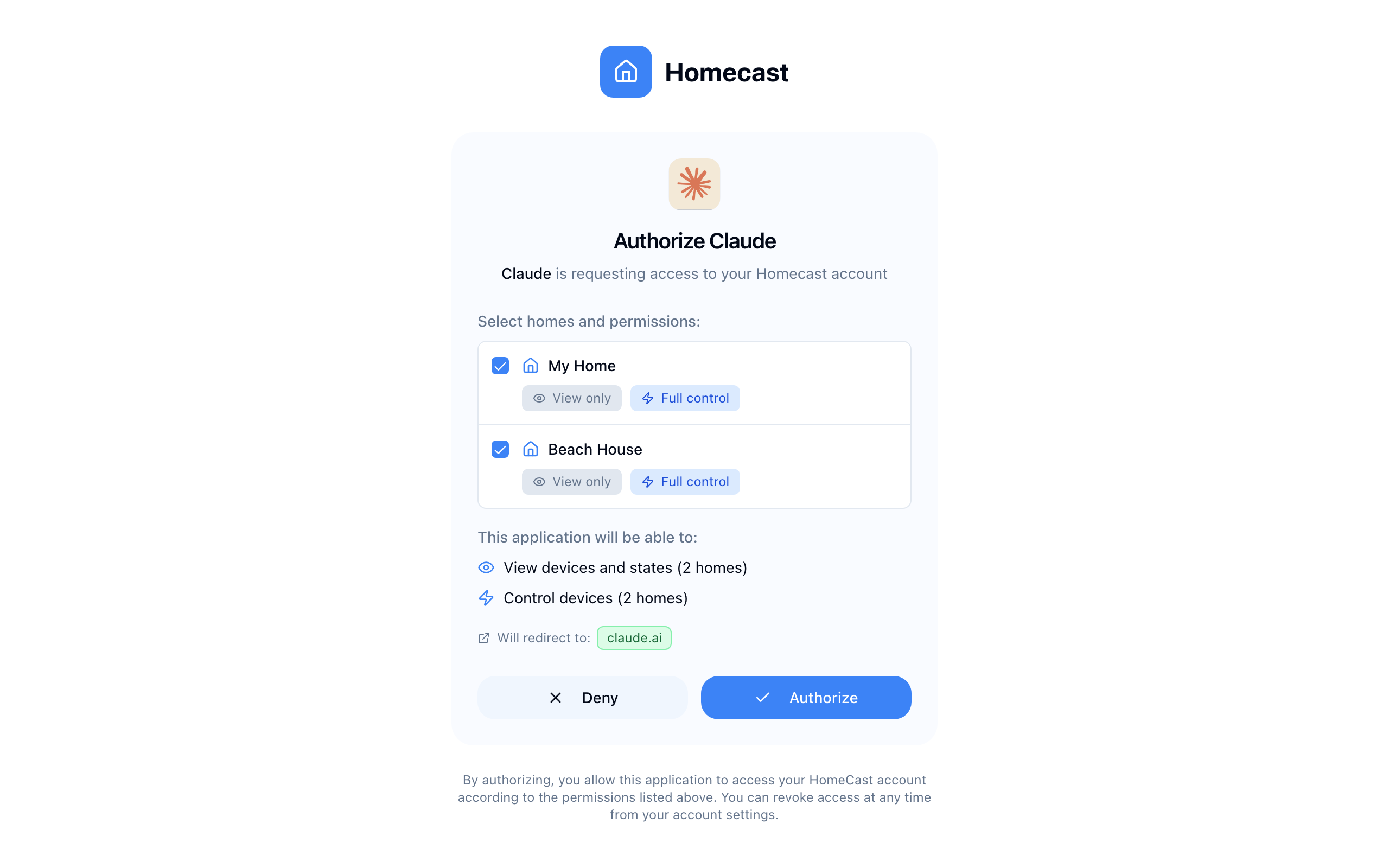
When using OAuth, users see a consent screen to choose homes and permissions:
Tools
Tool descriptions are personalized per account: tools/list embeds your actual home keys and room names into the get_state and get_automations descriptions, so assistants know valid filter values without an unfiltered discovery call. Only homes the token can access are included.
get_state
Read the current state of all accessible devices. Returns a hierarchical view of homes, rooms, and accessories.
| Parameter | Type | Required | Description |
|---|---|---|---|
filter_by_home | string | No | Filter to a specific home |
filter_by_room | string | No | Filter to a specific room |
filter_by_type | string | No | Filter by device type (e.g., lightbulb) |
filter_by_name | string | No | Filter by device name |
Virtual accessories are included alongside your HomeKit devices, so an assistant can read a mode or a counter the same way it reads a light. They are the state Apple Home has nowhere to store — "is the house in Away mode?" is a get_state call, not something to be inferred.
Annotations: Read-only tool. Does not modify device state.
set_state
Control one or more devices by setting characteristic values.
| Parameter | Type | Required | Description |
|---|---|---|---|
updates | array | Yes | List of device updates |
Each update object:
| Field | Type | Required | Description |
|---|---|---|---|
home | string | Yes | Home name |
room | string | Yes | Room name |
accessory | string | Yes | Accessory name |
on | boolean | No | Power state |
brightness | integer | No | Brightness 0–100 |
hue | integer | No | Color hue 0–360 |
saturation | integer | No | Color saturation 0–100 |
color_temp | integer | No | Color temperature (mireds) |
active | boolean | No | Active state |
heat_target | float | No | Heating target temperature |
cool_target | float | No | Cooling target temperature |
hvac_mode | string | No | off, heat, cool, auto |
lock_target | integer | No | 1 (lock), 0 (unlock) |
alarm_target | integer | No | Security alarm state |
speed | integer | No | Fan speed 0–100 |
volume | integer | No | Speaker volume 0–100 |
mute | boolean | No | Speaker mute |
target | integer | No | Position 0–100 |
Virtual accessories are set here too, using the characteristic get_state reports for them:
| Field | Type | Description |
|---|---|---|
virtual_mode | string | Mode — the option to select |
virtual_count | integer | Counter — sets the count, it does not add to it |
virtual_number | number | Number |
virtual_text | string | Text |
virtual_datetime | string | Date & time |
virtual_timer | string | Timer — "active" starts it, anything else cancels it |
A virtual Switch uses on, like any other switch. One that isn't adjustable ("Adjustable here" turned off) is reported in failed rather than changed.
Annotations: Mutating tool. Requires mcp:write scope or control home permission.
query_history
Bulk access to recorded history for pattern and behaviour analysis — the assistant does the analysis; this returns the data flexibly and fast. Any subset of accessories and characteristics, any date range, many series in one call.
| Parameter | Type | Required | Description |
|---|---|---|---|
home | string | No | Home name substring. Omit for the first home |
accessories | string[] | No | Accessory name/slug/id substrings. Omit for all recorded |
characteristics | string[] | No | Characteristic types (e.g. current_temperature, power_state, motion). Omit for all |
start | string | No | ISO 8601 start (default: 24h before end) |
end | string | No | ISO 8601 end (default: now) |
resolution | string | No | auto | raw | hourly | daily |
max_points_per_series | number | No | Per-series cap (default 500, max 2000); 50k points per response |
Resolution is the speed lever: hourly and daily read precomputed summaries, so a month of data is a few hundred rows per series — numeric buckets carry [time, min, avg, max], on/off and mode buckets carry [time, transitions, msInEachState]. raw returns every recorded change for short ranges and exact event times. Truncated series include continue_from — repeat the call with start=continue_from to page through large pulls. Requires Analytics to be enabled.
Annotations: Read-only.
get_history
Recorded history for one accessory — how its characteristics changed over time. Answers questions like "what was the temperature last night?", "when did the door open?", "how long was the heating on today?". Numeric characteristics come back as [isoTime, value] pairs with a min/avg/max summary; on/off and mode characteristics as [isoTime, state] transitions.
| Parameter | Type | Required | Description |
|---|---|---|---|
accessory | string | Yes | Accessory name substring, slug, or id |
home | string | No | Home name substring — narrows the search |
characteristic | string | No | One characteristic (e.g. current_temperature, on, motion). Omit for all recordable ones (up to 6) |
hours | number | No | How far back to look (default 24) |
max_points | number | No | Maximum points per series (default 200) |
History is opt-in and off by default — if nothing is recorded, the home owner has to turn it on in Settings → Homes → the home first; the tool says so rather than returning an error. See the Analytics guide.
Annotations: Read-only.
run_scene
Execute a HomeKit scene by name.
| Parameter | Type | Required | Description |
|---|---|---|---|
home | string | Yes | Home name |
name | string | Yes | Scene name |
Annotations: Mutating tool. Requires mcp:write scope or control home permission.
create_scene
Create a scene: a named snapshot of device states that can be run on demand with run_scene.
| Parameter | Type | Required | Description |
|---|---|---|---|
home | string | Yes | Home slug key |
name | string | Yes | Scene name (must end with a letter or number) |
actions | array | Yes | Device property changes the scene applies |
Each action entry uses the set_state vocabulary: { "accessory": "<slug>", ...properties } (e.g. on, brightness, heat_target). Get home/accessory slugs and property names from get_state. Requires a relay app version with scene management support.
Annotations: Mutating tool. Requires mcp:write scope or control home permission.
update_scene
Update a scene identified by name: rename it and/or replace all of its actions.
| Parameter | Type | Required | Description |
|---|---|---|---|
home | string | Yes | Home slug key |
name | string | Yes | Current scene name |
new_name | string | No | New name |
actions | array | No | New actions (same format as create_scene) — replaces all existing actions |
Built-in scenes and scenes that belong to an automation cannot be modified — for the latter, edit the automation instead (the error names it). Requires a relay app version with scene management support.
Annotations: Mutating tool. Requires mcp:write scope or control home permission.
delete_scene
Permanently delete a scene by name. Cannot be undone.
| Parameter | Type | Required | Description |
|---|---|---|---|
home | string | Yes | Home slug key |
name | string | Yes | Scene name |
Built-in scenes and scenes that belong to an automation cannot be deleted this way — for the latter, delete the automation instead (the error names it). Requires a relay app version with scene deletion support.
Annotations: Mutating and destructive tool. Requires mcp:write scope or control home permission.
Two automation engines
Homecast can create automations in two different systems, and they are not interchangeable. Picking the wrong one is the most common mistake an assistant makes, because HomeKit fails by simply not being able to express what you asked — there is no error to notice.
HomeKit (create_automation) | Homecast (create_hc_automation) | |
|---|---|---|
| Runs on | The Apple home hub (HomePod / Apple TV) | The Homecast relay Mac |
| Works when the Mac is off | Yes | No |
| Appears in the Apple Home app | Yes | No (appears in Homecast) |
Numeric thresholds (above / below) | No — equality only | Yes |
| Multiple conditions with AND/OR/NOT | No — all conditions ANDed, equality only | Yes |
| Remembers state between runs | No | Yes, via virtual accessories |
| Virtual accessories | Invisible — slugs will not resolve | Yes |
| Delays, notifications, scenes as actions | Device properties only | Yes |
| Needs the relay's Apple ID to have edit access | Yes | No |
| Automation id survives an edit | No — editing the trigger recreates it | Yes |
The rule: default to create_hc_automation. Reach for create_automation only when the automation must keep running while the relay Mac is off, or when the user explicitly wants it in the Apple Home app.
Two requests that HomeKit cannot serve, and that should never be reported as impossible:
- A threshold — "when humidity goes above 65%", "if it drops below 5°C". HomeKit triggers and conditions test equality only. Use a Homecast
numerictrigger. - Anything stateful — "don't start it again if it's already running", "only once per day", "remember what the temperature was". HomeKit has nowhere to store that. Use a Homecast automation with a virtual accessory.
get_automations
List HomeKit automations across all homes. Returns {home_key: [automation]} where each automation has id, name, enabled, editable, trigger, actions, and last_fired.
| Parameter | Type | Required | Description |
|---|---|---|---|
filter_by_home | string | No | Filter to a specific home |
The trigger and actions objects are returned in exactly the format create_automation accepts, so an assistant can read an automation, modify it, and send it back.
Automations created outside Homecast with presence, location, or app-specific triggers are returned with editable: false — they can be renamed, enabled/disabled, and deleted, but their trigger and actions cannot be changed. A trigger.activation_issue field (e.g. disabledNoHomeHub) indicates HomeKit has deactivated the automation, usually because no home hub is available.
Homes where the relay's Apple ID has view-only access in Apple Home are listed in _meta.view_only_homes — their automations are read-only from Homecast (view-only is a supported configuration; everything except HomeKit-automation editing works normally). The personalized tool descriptions also annotate these homes with "HomeKit automations read-only".
Annotations: Read-only tool.
create_automation
Create a HomeKit automation: when the trigger fires (and all conditions pass), the actions set device properties. Homes, accessories, and properties use the same slug keys and names as get_state/set_state.
| Parameter | Type | Required | Description |
|---|---|---|---|
home | string | Yes | Home slug key |
name | string | Yes | Automation name |
trigger | object | Yes | Timer or event trigger (see below) |
actions | array | Yes | Device property changes to apply |
Timer trigger — fires at a time of day:
{ "type": "timer", "hour": 7, "minute": 30, "recurrenceType": "daily" }or a one-off: { "type": "timer", "fireDate": "2026-08-01T07:00:00Z" }. Optional timeZone (IANA identifier).
Event trigger — fires on device or environmental events:
{
  "type": "event",
  "events": [{ "type": "significantTime", "significantEvent": "sunset", "offsetMinutes": -15 }],
  "conditions": [{ "type": "characteristic", "accessory": "alarm_eeff", "characteristic": "alarm_state", "value": "away" }],
  "recurrences": [{ "weekday": 1 }, { "weekday": 7 }]
}
Supported event types:
| Event | Fields | Fires when |
|---|---|---|
characteristic | accessory, characteristic, value | A device property becomes a value (e.g. motion = true) |
significantTime | significantEvent (sunrise/sunset), offsetMinutes (optional, negative = before) | Sunrise or sunset |
calendar | calendarComponents (hour, minute, optional weekday/day/month) | A time of day |
duration | durationSeconds | A repeating interval |
Optional event-trigger fields: conditions (all must be true; equality only), endEvents (deactivating events), recurrences (limit days; weekday 1=Sunday…7=Saturday), executeOnce.
Each action entry uses the set_state vocabulary: { "accessory": "<slug>", ...properties } (e.g. on, brightness, alarm_target).
Limitations (imposed by Apple's HomeKit framework):
- The relay Mac's Apple ID must have edit access in Apple Home ("Add & Edit Accessories", called "Allow Editing" on older iOS). Edit access is optional — homes without it are read-only for automations, and create/update/delete fail with
INSUFFICIENT_HOMEKIT_PRIVILEGES— see Troubleshooting. - Presence and location triggers cannot be created — only the Apple Home app can create them.
- Conditions support equality only (no greater/less-than or time windows).
- Actions set device properties only; they cannot run a scene.
- Automation names must end with a letter or number — HomeKit rejects trailing punctuation (e.g.
Lights (evening)fails; the error suggests a valid variant).
Annotations: Mutating tool. Requires mcp:write scope or control home permission.
update_automation
Update an existing automation. Only the provided fields change.
| Parameter | Type | Required | Description |
|---|---|---|---|
home | string | Yes | Home slug key |
id | string | Yes | Automation id from get_automations |
name | string | No | New name |
trigger | object | No | New trigger (same format as create_automation) |
actions | array | No | New actions — replaces all existing actions |
enabled | boolean | No | Enable or disable the automation |
Changing the trigger deletes and recreates the automation inside HomeKit, so the response may contain a new id — always use the returned id afterwards. Automations with editable: false accept only name and enabled changes. Like create_automation, this requires the relay's Apple ID to have edit access in Apple Home.
Annotations: Mutating tool. Requires mcp:write scope or control home permission.
delete_automation
Permanently delete an automation. Cannot be undone — to stop an automation temporarily, use update_automation with enabled: false.
| Parameter | Type | Required | Description |
|---|---|---|---|
home | string | Yes | Home slug key |
id | string | Yes | Automation id from get_automations |
Annotations: Mutating and destructive tool. Requires mcp:write scope or control home permission.
Homecast automation tools
These drive the Homecast automation engine rather than HomeKit — see Two automation engines for which to use. Automations created here are ordinary automations in the app's visual editor: laid out automatically, fully editable afterwards.
get_hc_automations
List Homecast automations across all homes. Returns {home_key: [automation]} where each has id, name, enabled, mode, triggers, conditions, actions, last_triggered, trigger_count and editable_via_mcp.
| Parameter | Type | Required | Description |
|---|---|---|---|
filter_by_home | string | No | Filter to a specific home |
Triggers, conditions and actions come back in exactly the format create_hc_automation accepts, so an assistant can read one, modify it, and send it back.
editable_via_mcp: false means the automation uses nodes this grammar has no words for — code nodes, HTTP requests, branching, sub-workflows — because it was built in the visual editor. It can still be renamed, enabled/disabled or deleted, but resending its triggers and actions would drop those nodes. Parts that could not be read are marked _unsupported.
Annotations: Read-only tool.
create_hc_automation
| Parameter | Type | Required | Description |
|---|---|---|---|
home | string | Yes | Home slug key |
name | string | Yes | Automation name (no trailing-punctuation rule, unlike HomeKit) |
triggers | array | Yes | Any one firing runs the automation |
actions | array | Yes | Run in order |
conditions | array | No | All must pass; nest a block for OR/NOT |
enabled | boolean | No | Defaults to true |
mode | string | No | single (default), restart, queued, parallel |
description | string | No | Note shown in the editor |
Triggers
| Type | Shape |
|---|---|
device | {"type":"device","accessory":"<slug>","characteristic":"<prop>","to":<v>,"from":<v>,"for":<seconds>} |
numeric | {"type":"numeric","accessory":"<slug>","characteristic":"<prop>","above":<n>,"below":<n>,"for":<seconds>} |
time | {"type":"time","at":"07:30","weekdays":[1,2,3,4,5]} (0 = Sunday) |
sun | {"type":"sun","event":"sunrise"|"sunset","offset":{"minutes":-30}} |
webhook | {"type":"webhook","webhook_id":"<id>"} |
device and numeric can take "virtual":"<slug>" instead of "accessory" to trigger off a virtual accessory, or "service_group":"<id>" for a group. Durations accept bare seconds or {hours, minutes, seconds}.
Conditions
| Type | Shape |
|---|---|
device | {"type":"device","accessory":"<slug>","characteristic":"<prop>","value":<v>} |
numeric | {"type":"numeric","accessory":"<slug>","characteristic":"<prop>","above":<n>,"below":<n>} |
virtual | {"type":"virtual","virtual":"<slug>","equals":<v>} (or above/below) |
time | {"type":"time","after":"09:00","before":"21:00","weekdays":[...]} |
sun | {"type":"sun","after":"sunset","before":"sunrise"} |
template | {"type":"template","expression":"<expression>"} |
Nest {"operator":"or"\|"not","conditions":[...]} for anything other than AND.
Actions
| Type | Shape |
|---|---|
device | {"type":"device","accessory":"<slug>", ...properties} — same vocabulary as set_state; several properties in one action is fine |
virtual | {"type":"virtual","virtual":"<slug>","operation":"set","value":<v>} |
scene | {"type":"scene","scene":"<name>"} |
delay | {"type":"delay","seconds":300} |
notify | {"type":"notify","message":"...","title":"..."} |
Virtual operations: set, turn_on, turn_off, toggle, increment, decrement, reset, start, pause, resume, cancel, finish.
Annotations: Mutating tool. Requires mcp:write scope or control home permission.
update_hc_automation
Same parameters as create_hc_automation, plus id. Everything except home and id is optional.
Every part is optional and merged independently against what is stored, so you can change one thing without resending the rest: enabled alone pauses an automation, actions alone rewrites what it does while keeping its triggers and conditions, and anything you omit is left exactly as it was.
Passing triggers, conditions or actions replaces that whole list — send the complete set for the part you are changing. Passing conditions: [] explicitly is how you clear conditions; omitting the field keeps them. Unlike HomeKit, the id is stable across updates.
Annotations: Mutating tool.
delete_hc_automation
| Parameter | Type | Required | Description |
|---|---|---|---|
home | string | Yes | Home slug key |
id | string | Yes | Automation id from get_hc_automations |
Annotations: Mutating and destructive tool.
create_virtual_accessory
Create a value the home remembers — the state HomeKit has nowhere to put. See the virtual accessories guide for the concept.
| Parameter | Type | Required | Description |
|---|---|---|---|
home | string | Yes | Home slug key |
name | string | Yes | Display name |
type | string | Yes | switch, mode, number, counter, timer, text or date |
options | array | For mode | The named choices |
initial | — | No | Starting value; defaults to the first option for mode |
min / max | number | For number | Range |
step | number | No | Increment for number / counter |
unit | string | No | Display unit for number |
duration | number | No | Default duration for timer, in seconds |
controllable | boolean | No | Whether a person can change it from the dashboard |
The accessory appears in get_state alongside real devices and is writable with set_state. HomeKit cannot see it, so it will not resolve in create_automation — automations that depend on one must be Homecast automations.
Annotations: Mutating tool.
update_virtual_accessory
Change an accessory's definition — not its value. Provide home and id plus only the fields you are changing; everything from create_virtual_accessory except type is accepted.
To change the accessory's current value, use set_state, exactly as you would for a real device.
type cannot be changed — a mode is not a counter, and the stored value would not survive. Delete and recreate instead.
Replacing a mode's options swaps the whole list. If the option it starts on is no longer in it, the start value moves to the first option, so the accessory can't be left holding a value nothing can select and no condition can match.
Automations referencing the accessory keep working — they resolve it by id, not by name — but a rename changes its slug, so re-read get_state before referring to it again.
Annotations: Mutating tool.
delete_virtual_accessory
| Parameter | Type | Required | Description |
|---|---|---|---|
home | string | Yes | Home slug key |
id | string | Yes | Virtual accessory slug or id |
Any automation still referencing it will fail to resolve it — check get_hc_automations first.
Annotations: Mutating and destructive tool.
Worked example: a stateful, threshold-driven automation
"Set the bedroom aircon to dehumidify when the humidity goes above 65%, but don't fight me if I turn it off myself."
Neither half of that is expressible in HomeKit: above 65 is a threshold, and "don't fight me" needs memory of whether the cycle was ours. Both are ordinary Homecast automations.
1. Create the memory. A mode accessory holds where the cycle is up to:
{
  "home": "george_street_bcab",
  "name": "Bedroom 1 Dry Cycle",
  "type": "mode",
  "options": ["Idle", "Running", "Cancelled"]
}
The response carries the slug — say bedroom_1_dry_cycle_4ad9 — to reference below.
2. Start the cycle when it gets humid, but only if we aren't already running and the user hasn't got the unit on themselves:
{
  "home": "george_street_bcab",
  "name": "Bedroom 1 dry cycle start",
  "triggers": [
    {"type": "numeric", "accessory": "bedroom_1_underfloor_heating_4ad9",
     "characteristic": "relative_humidity", "above": 65, "for": {"minutes": 10}}
  ],
  "conditions": [
    {"type": "virtual", "virtual": "bedroom_1_dry_cycle_4ad9", "equals": "Idle"},
    {"type": "device", "accessory": "bedroom_1_air_conditioner_7f60",
     "characteristic": "active", "value": false}
  ],
  "actions": [
    {"type": "device", "accessory": "bedroom_1_air_conditioner_7f60",
     "active": true, "hvac_mode": "cool", "cool_target": 18},
    {"type": "virtual", "virtual": "bedroom_1_dry_cycle_4ad9",
     "operation": "set", "value": "Running"}
  ]
}
The "for": {"minutes": 10} matters: without it a sensor flickering across 65% starts a cycle every time it crosses.
3. Stop when it's dry, and hand the memory back to Idle:
{
  "home": "george_street_bcab",
  "name": "Bedroom 1 dry cycle finish",
  "triggers": [
    {"type": "numeric", "accessory": "bedroom_1_underfloor_heating_4ad9",
     "characteristic": "relative_humidity", "below": 60}
  ],
  "conditions": [
    {"type": "virtual", "virtual": "bedroom_1_dry_cycle_4ad9", "equals": "Running"}
  ],
  "actions": [
    {"type": "device", "accessory": "bedroom_1_air_conditioner_7f60", "active": false},
    {"type": "virtual", "virtual": "bedroom_1_dry_cycle_4ad9",
     "operation": "set", "value": "Idle"}
  ]
}
4. Notice a manual override. If the unit goes off while it's still humid, that wasn't us — step 3 only runs below 60%:
{
  "home": "george_street_bcab",
  "name": "Bedroom 1 dry cycle cancelled",
  "triggers": [
    {"type": "device", "accessory": "bedroom_1_air_conditioner_7f60",
     "characteristic": "active", "to": false}
  ],
  "conditions": [
    {"type": "virtual", "virtual": "bedroom_1_dry_cycle_4ad9", "equals": "Running"},
    {"type": "numeric", "accessory": "bedroom_1_underfloor_heating_4ad9",
     "characteristic": "relative_humidity", "above": 60}
  ],
  "actions": [
    {"type": "virtual", "virtual": "bedroom_1_dry_cycle_4ad9",
     "operation": "set", "value": "Cancelled"}
  ]
}
Notes worth carrying to other stateful automations:
- Hysteresis. Starting at 65% and stopping at 60% — rather than both at 65% — is what stops the pair thrashing.
- Guard the override detector. Step 3 also turns the unit off, which fires step 4's trigger. The
above 60condition is what distinguishes "finished normally" from "someone intervened", because step 3 only ever runs below 60. - Reset the memory. As written,
Cancelledonly returns toIdlewhen a fourth automation says so — add atimetrigger at, say, 07:00 that setsCancelled→Idleif you want "leave it alone for today" rather than "leave it alone forever". - Restoring what you overwrote. Step 2 writes
cool_target: 18and never puts back what was there. If that matters, stash the old value in anumbervirtual accessory first and restore it in step 3.
OAuth scopes
| Scope | Permissions |
|---|---|
mcp:read | get_state, get_automations, get_hc_automations |
mcp:write | All tools including set_state, scene management, and automation management in both engines |
mcp:admin | Full access including management |
Client configuration
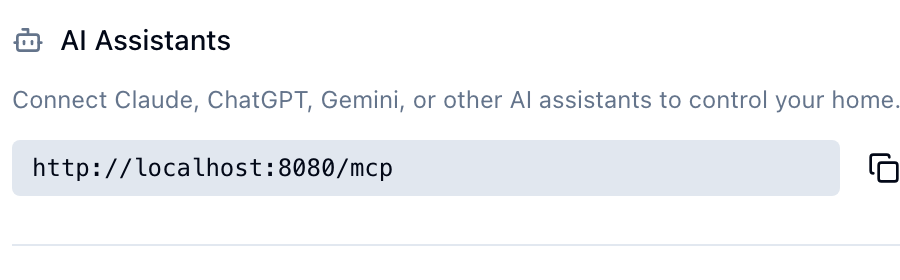
You can find the MCP endpoint URL in the Share dialog for any home under AI Assistants.
With OAuth (recommended)
{
  "mcpServers": {
    "homecast": {
      "type": "url",
      "url": "https://api.homecast.cloud/mcp"
    }
  }
}
The client discovers OAuth endpoints automatically and prompts for authorization.
With access token
{
  "mcpServers": {
    "homecast": {
      "type": "url",
      "url": "https://api.homecast.cloud/mcp",
      "headers": {
        "Authorization": "Bearer hc_your_token_here"
      }
    }
  }
}
For a step-by-step setup guide, see Connect an AI Assistant.