
React to Device Events
Webhooks let you run code when things happen in your home. When a device changes state, Homecast sends an HTTP POST to your URL with the event details.
Device → HomeKit → Relay → Server → Your webhook endpointCreate a webhook
Enable Developer Mode in Settings → Account, then manage webhooks from the dashboard under Settings → Webhooks → Manage, or programmatically via the GraphQL API.
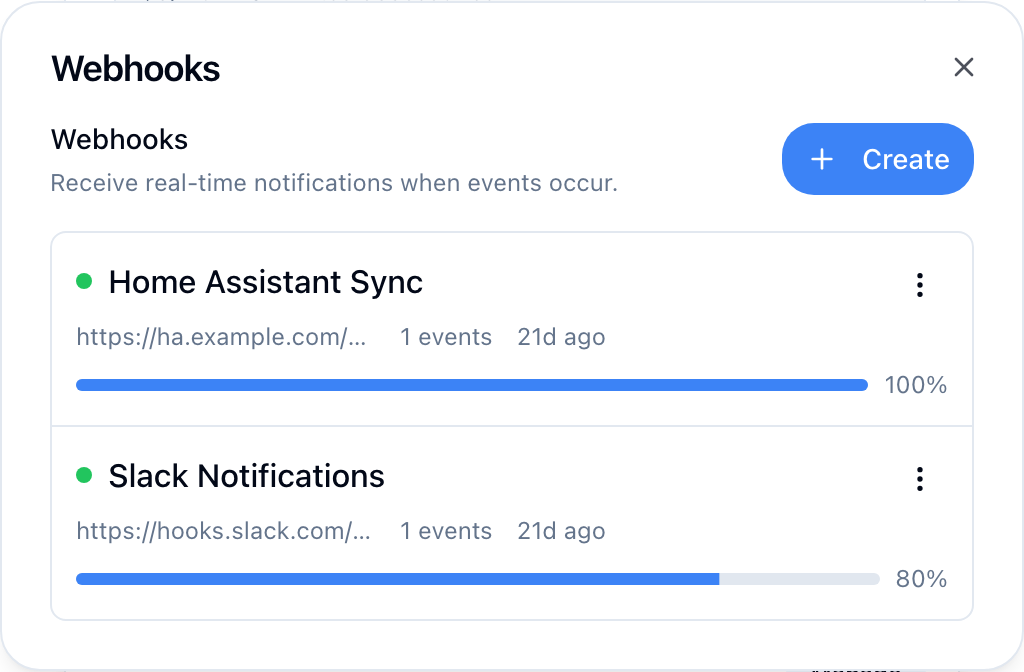
Use the GraphQL API to create a webhook:
mutation {
  createWebhook(
    name: "My Automation"
    url: "https://your-server.com/webhook"
    eventTypes: ["state.changed"]
    homeIds: ["home-uuid"]
  ) {
    success
    webhook {
      id
      name
      rawSecret
    }
  }
}
Save the secret
The rawSecret is only returned on creation. Store it immediately — you'll need it to verify webhook signatures.
Filter events
Control which events trigger your webhook:
| Filter | Example | Description |
|---|---|---|
eventTypes | ["state.changed"] | Which event types to receive. Use ["*"] for all. |
homeIds | ["home-uuid"] | Only events from these homes |
roomIds | ["room-uuid"] | Only events from these rooms |
accessoryIds | ["acc-uuid"] | Only events from these accessories |
collectionIds | ["coll-uuid"] | Only events from accessories in these collections |
Payload format
When an event fires, Homecast POSTs a JSON payload to your URL:
{
  "id": "evt-uuid",
  "type": "state.changed",
  "timestamp": "2026-02-16T08:30:00Z",
  "webhook_id": "webhook-uuid",
  "data": {
    "accessoryId": "acc-uuid",
    "accessoryName": "Motion Sensor",
    "characteristicType": "motion_detected",
    "value": true,
    "homeId": "home-uuid",
    "roomId": "room-uuid"
  },
  "metadata": {
    "webhook_version": "1.0",
    "webhook_name": "My Automation"
  }
}
Headers
Every webhook delivery includes these headers:
| Header | Description |
|---|---|
Content-Type | application/json |
X-Homecast-Signature | HMAC signature for verification |
X-Homecast-Timestamp | Unix timestamp of the delivery |
X-Homecast-Event | Event type (e.g., state.changed) |
X-Homecast-Delivery | Unique delivery ID |
User-Agent | Homecast-Webhook/1.0 |
Verify signatures
Always verify webhook signatures to ensure the request came from Homecast. The signature uses HMAC-SHA256.
Algorithm:
- Read the
X-Homecast-Signatureheader:t={timestamp},v1={signature} - Build the signed message:
{timestamp}.{raw_request_body} - Compute HMAC-SHA256 of the message using your webhook secret
- Compare with the
v1value from the header
import hmac
import hashlib

def verify_webhook(payload: bytes, signature_header: str, secret: str) -> bool:
    # Parse "t=123456,v1=abc..."
    parts = dict(p.split("=", 1) for p in signature_header.split(","))
    timestamp = parts["t"]
    expected_sig = parts["v1"]

    # Build signed message
    message = f"{timestamp}.{payload.decode()}"
    computed = hmac.new(
        secret.encode(), message.encode(), hashlib.sha256
    ).hexdigest()

return hmac.compare_digest(computed, expected_sig)const crypto = require("crypto");
function verifyWebhook(payload, signatureHeader, secret) {
const parts = Object.fromEntries(
signatureHeader.split(",").map(p => p.split("=", 2))
);
const message = `${parts.t}.${payload}`;
const computed = crypto
.createHmac("sha256", secret)
.update(message)
.digest("hex");
return crypto.timingSafeEqual(
Buffer.from(computed),
Buffer.from(parts.v1)
);
}import (
"crypto/hmac"
"crypto/sha256"
"encoding/hex"
"fmt"
"strings"
)
func verifyWebhook(payload []byte, signatureHeader, secret string) bool {
parts := make(map[string]string)
for _, p := range strings.Split(signatureHeader, ",") {
kv := strings.SplitN(p, "=", 2)
parts[kv[0]] = kv[1]
}
message := fmt.Sprintf("%s.%s", parts["t"], string(payload))
mac := hmac.New(sha256.New, []byte(secret))
mac.Write([]byte(message))
expected := hex.EncodeToString(mac.Sum(nil))
return hmac.Equal([]byte(expected), []byte(parts["v1"]))
}Timestamp tolerance
Reject deliveries where the timestamp is more than 5 minutes old to prevent replay attacks.
Retry and reliability
If your endpoint returns a non-2xx status code or is unreachable, Homecast retries with exponential backoff:
| Attempt | Delay |
|---|---|
| 1 | Immediate |
| 2 | 1 second |
| 3 | 2 seconds |
| 4 | 4 seconds |
| 5 | 8 seconds |
| 6 | 16 seconds |
After all retries are exhausted, the delivery is marked as dead_letter.
Circuit breaker: If a webhook accumulates 5 consecutive failures, Homecast pauses it automatically. Fix the issue, then resume the webhook to reset the counter.
Manage webhooks
Use GraphQL mutations to manage your webhooks:
| Mutation | Description |
|---|---|
createWebhook(...) | Create a new webhook |
updateWebhook(id, ...) | Update URL, filters, or name |
pauseWebhook(id) | Pause deliveries |
resumeWebhook(id) | Resume a paused webhook |
rotateWebhookSecret(id) | Generate a new signing secret |
testWebhook(id) | Send a test delivery |
deleteWebhook(id) | Permanently delete |
webhookDeliveries(webhookId) | View delivery history |
Example: motion-triggered notification
A Flask endpoint that receives motion events and sends a push notification:
from flask import Flask, request, jsonify
import hmac, hashlib, requests

app = Flask(__name__)
WEBHOOK_SECRET = "your_webhook_secret"
PUSHOVER_TOKEN = "your_pushover_token"
PUSHOVER_USER = "your_pushover_user"

@app.post("/webhook")
def handle_webhook():
    # Verify signature
    sig = request.headers.get("X-Homecast-Signature", "")
    if not verify_signature(request.data, sig, WEBHOOK_SECRET):
        return jsonify({"error": "invalid signature"}), 401

    event = request.json
    data = event["data"]

    if data.get("characteristicType") == "motion_detected" and data.get("value"):
        requests.post("https://api.pushover.net/1/messages.json", data={
            "token": PUSHOVER_TOKEN,
            "user": PUSHOVER_USER,
            "message": f"Motion detected: {data['accessoryName']}"
        })

    return jsonify({"ok": True})

def verify_signature(payload, signature_header, secret):
    parts = dict(p.split("=", 1) for p in signature_header.split(","))
    message = f"{parts['t']}.{payload.decode()}"
    computed = hmac.new(secret.encode(), message.encode(), hashlib.sha256).hexdigest()
    return hmac.compare_digest(computed, parts["v1"])
For the full webhook configuration reference, see Webhooks reference.