
Build Home Automation Scripts
Homecast exposes REST and GraphQL APIs for programmatic control of your HomeKit devices. This guide walks through creating a token, reading state, controlling devices, and building a complete automation script.
Get an API token
- Sign in at homecast.cloud
- Enable Developer Mode in Settings → Account
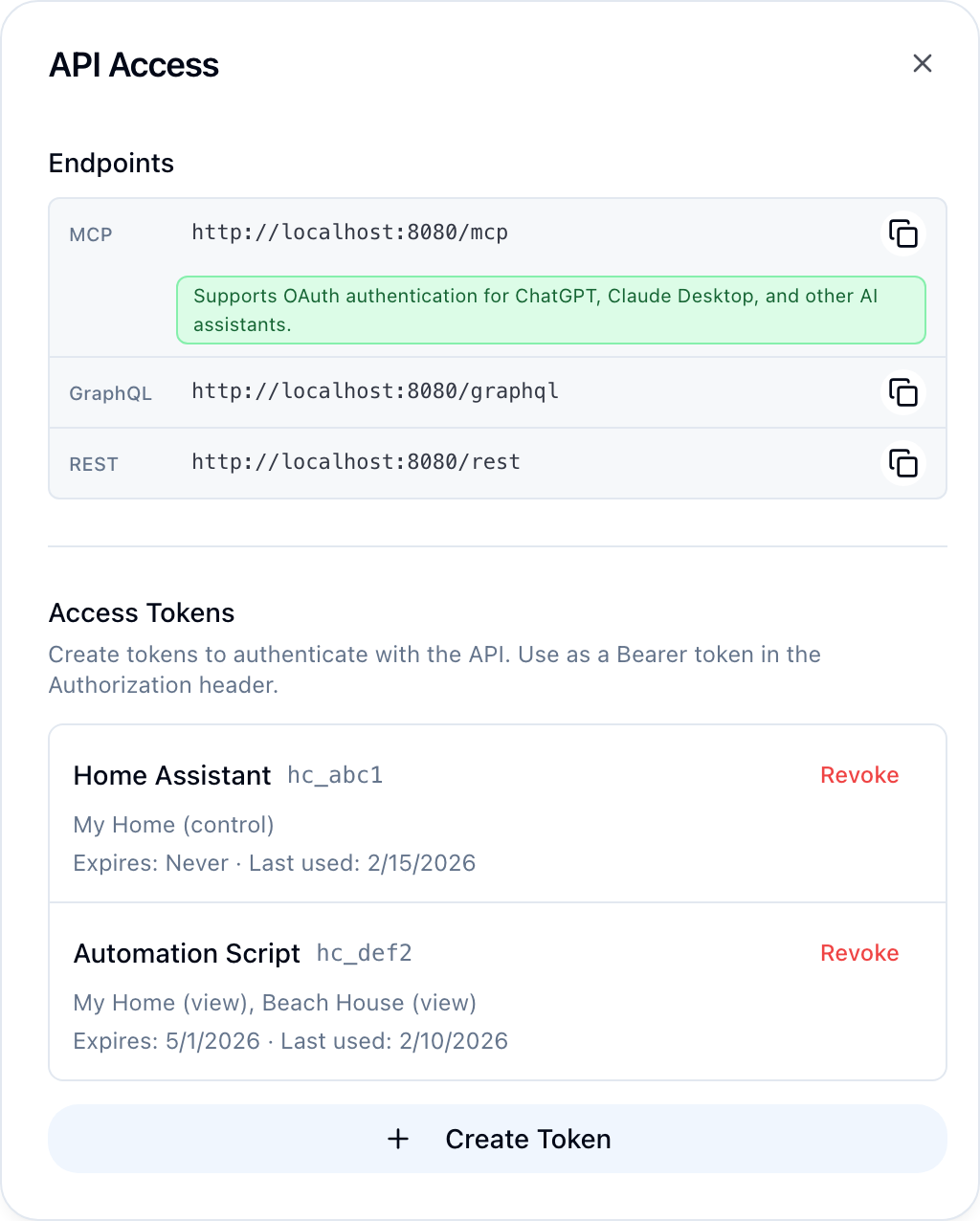
- Open Settings → API Access → Manage
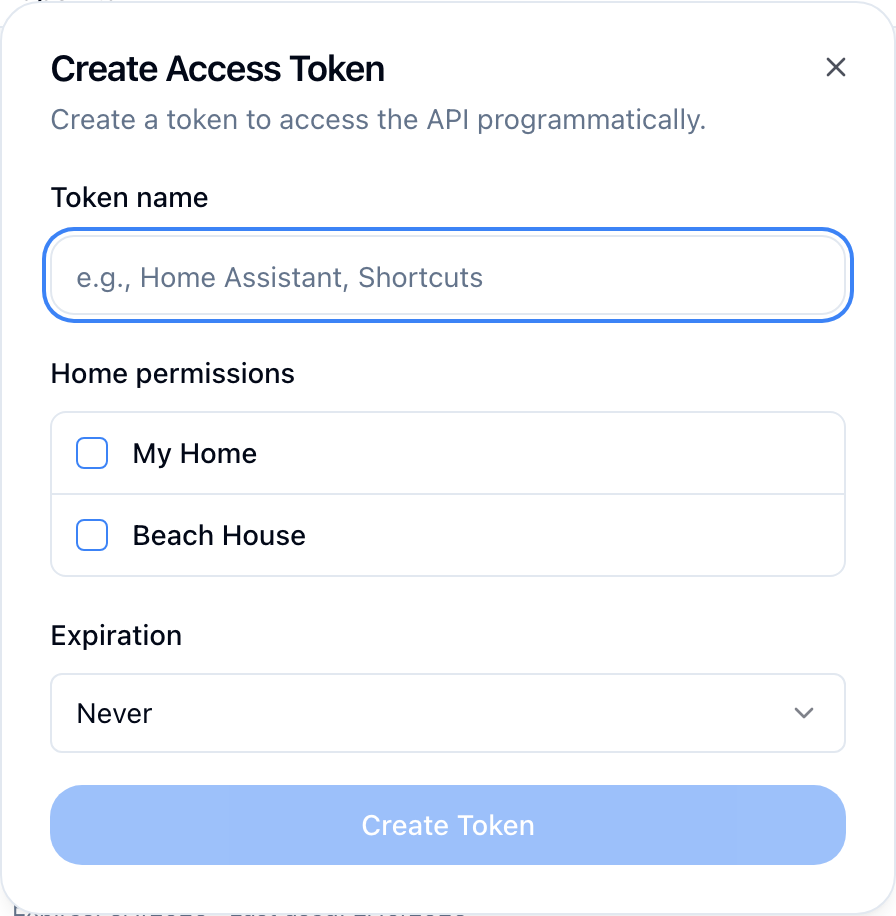
- Click Create Token
- Name the token (e.g., "automation-script")
- Set home permissions — choose which homes the token can access and whether it gets
vieworcontrolaccess - Copy the token — it starts with
hc_and is only shown once
Store tokens securely
Treat your token like a password. Store it in environment variables or a secrets manager, never in source code.
Read your home state
The REST API returns a hierarchical view of your homes, rooms, and accessories.
curl https://api.homecast.cloud/rest/state \
-H "Authorization: Bearer hc_your_token_here"import requests
resp = requests.get(
"https://api.homecast.cloud/rest/state",
headers={"Authorization": "Bearer hc_your_token_here"}
)
state = resp.json()const resp = await fetch("https://api.homecast.cloud/rest/state", {
headers: { Authorization: "Bearer hc_your_token_here" }
});
const state = await resp.json();The response is a nested structure:
{
  "homes": [
    {
      "id": "home-uuid",
      "name": "My Home",
      "rooms": [
        {
          "id": "room-uuid",
          "name": "Living Room",
          "accessories": [
            {
              "id": "acc-uuid",
              "name": "Floor Lamp",
              "type": "lightbulb",
              "reachable": true,
              "services": [
                {
                  "type": "lightbulb",
                  "characteristics": [
                    { "type": "on", "value": true },
                    { "type": "brightness", "value": 75 }
                  ]
                }
              ]
            }
          ]
        }
      ]
    }
  ]
}
Filter the response
Use query parameters to narrow results:
| Parameter | Example | Description |
|---|---|---|
home | ?home=My Home | Only accessories in this home |
room | ?room=Bedroom | Only accessories in this room |
type | ?type=lightbulb | Only this accessory type |
name | ?name=Floor Lamp | Only accessories matching this name |
curl "https://api.homecast.cloud/rest/state?type=lightbulb&room=Bedroom" \
  -H "Authorization: Bearer hc_your_token_here"
Control a device
Send a POST to /rest/state with the target accessory and desired state:
curl -X POST https://api.homecast.cloud/rest/state \
  -H "Authorization: Bearer hc_your_token_here" \
  -H "Content-Type: application/json" \
  -d '{
    "home": "My Home",
    "room": "Living Room",
    "accessory": "Floor Lamp",
    "on": true,
    "brightness": 80
}'resp = requests.post(
"https://api.homecast.cloud/rest/state",
headers={
"Authorization": "Bearer hc_your_token_here",
"Content-Type": "application/json"
},
json={
"home": "My Home",
"room": "Living Room",
"accessory": "Floor Lamp",
"on": True,
"brightness": 80
}
)
result = resp.json()
print(f"Updated: {result['updated']}, Failed: {result['failed']}")const resp = await fetch("https://api.homecast.cloud/rest/state", {
method: "POST",
headers: {
Authorization: "Bearer hc_your_token_here",
"Content-Type": "application/json"
},
body: JSON.stringify({
home: "My Home",
room: "Living Room",
accessory: "Floor Lamp",
on: true,
brightness: 80
})
});
const result = await resp.json();Update properties
Each update object must include home, room, and accessory (by name). All other fields are optional — only include the properties you want to change.
| Property | Type | Description |
|---|---|---|
home | string | Home name (required) |
room | string | Room name (required) |
accessory | string | Accessory name (required) |
on | boolean | Power state |
brightness | integer | Brightness 0–100 |
hue | integer | Color hue 0–360 |
saturation | integer | Color saturation 0–100 |
color_temp | integer | Color temperature in mireds |
active | boolean | Active state (air purifiers, humidifiers) |
heat_target | float | Heating target temperature |
cool_target | float | Cooling target temperature |
hvac_mode | string | HVAC mode: off, heat, cool, auto |
lock_target | integer | Lock state: 1 (secured), 0 (unsecured) |
alarm_target | integer | Security alarm target state |
speed | integer | Fan speed 0–100 |
volume | integer | Speaker volume 0–100 |
mute | boolean | Speaker mute |
target | integer | Generic target position 0–100 (blinds, garage doors) |
The response:
{
  "updated": 1,
  "failed": 0,
  "changes": ["Floor Lamp: on=true, brightness=80"],
  "errors": [],
  "message": "Updated 1 accessories"
}
Run a scene
Execute a HomeKit scene by name:
curl -X POST https://api.homecast.cloud/rest/scene \
  -H "Authorization: Bearer hc_your_token_here" \
  -H "Content-Type: application/json" \
-d '{"home": "My Home", "name": "Good Night"}'resp = requests.post(
"https://api.homecast.cloud/rest/scene",
headers={
"Authorization": "Bearer hc_your_token_here",
"Content-Type": "application/json"
},
json={"home": "My Home", "name": "Good Night"}
)Go deeper with GraphQL
The GraphQL API at /graphql provides typed queries and mutations for everything the REST API does, plus user management, webhooks, sharing, and more.
curl -X POST https://api.homecast.cloud/graphql \
  -H "Authorization: Bearer hc_your_token_here" \
  -H "Content-Type: application/json" \
  -d '{
    "query": "{ homes { id name rooms { id name accessories { id name category services { type characteristics { type value } } } } } }"
  }'
Set a characteristic via GraphQL:
mutation {
  setCharacteristic(
    accessoryId: "acc-uuid"
    characteristicType: "brightness"
    value: "50"
    homeId: "home-uuid"
  ) {
    success
    value
  }
}
See the GraphQL reference for the complete schema.
Real-time updates
Use webhooks to get notified when device state changes. See the webhook automation guide for setup.
Example: lights-off automation
A complete script that turns off all lights after midnight:
#!/usr/bin/env python3
"""Turn off all lights if it's past midnight."""

import requests
from datetime import datetime

TOKEN = "hc_your_token_here"
API = "https://api.homecast.cloud/rest"
HEADERS = {"Authorization": f"Bearer {TOKEN}", "Content-Type": "application/json"}

def main():
    hour = datetime.now().hour
    if hour >= 0 and hour < 5:
        # Get all lights
        resp = requests.get(f"{API}/state?type=lightbulb", headers=HEADERS)
        state = resp.json()

        for home in state["homes"]:
            for room in home["rooms"]:
                for acc in room["accessories"]:
                    # Check if light is on
                    for svc in acc.get("services", []):
                        for char in svc.get("characteristics", []):
                            if char["type"] == "on" and char["value"] is True:
                                resp = requests.post(
                                    f"{API}/state",
                                    headers=HEADERS,
                                    json={
                                        "home": home["name"],
                                        "room": room["name"],
                                        "accessory": acc["name"],
                                        "on": False
                                    }
                                )
                                result = resp.json()
                                print(f"Turned off {acc['name']}: {result}")

        print("Done")

if __name__ == "__main__":
    main()
Run this with cron to check every 15 minutes:
*/15 * * * * /usr/bin/python3 /path/to/lights_off.pyManaging HomeKit automations via GraphQL
Homecast can also manage HomeKit automations (triggers + actions) that run on your Home Hub. These sync with the Apple Home app.
List automations
{
  automations(homeId: "home-uuid") {
    id
    name
    isEnabled
    trigger {
      type
      fireDate
      events { type significantEvent offsetMinutes }
    }
    actions {
      accessoryName
      characteristicType
      targetValue
    }
  }
}
Create an automation
The trigger and actions parameters are JSON strings.
curl -X POST https://api.homecast.cloud/graphql \
  -H "Authorization: Bearer hc_your_token_here" \
  -H "Content-Type: application/json" \
  -d '{
    "query": "mutation($homeId: String!, $name: String!, $trigger: String!, $actions: String!) { createAutomation(homeId: $homeId, name: $name, trigger: $trigger, actions: $actions) { id name isEnabled } }",
    "variables": {
      "homeId": "home-uuid",
      "name": "Sunset Lights",
      "trigger": "{\"type\":\"event\",\"events\":[{\"type\":\"significantTime\",\"significantEvent\":\"sunset\",\"offsetMinutes\":-15}]}",
      "actions": "[{\"accessoryId\":\"acc-uuid\",\"characteristicType\":\"power_state\",\"targetValue\":true}]"
    }
  }'
Enable or disable
mutation {
  setAutomationEnabled(automationId: "auto-uuid", enabled: false) {
    id
    name
    isEnabled
  }
}
Delete
mutation {
  deleteAutomation(automationId: "auto-uuid") {
    success
    automationId
  }
}
See the GraphQL reference for the complete automation schema.
Home permissions
API tokens can be scoped to specific homes with specific access levels:
{
  "home-uuid-1": "control",
  "home-uuid-2": "view"
}control— Read state and set valuesview— Read state only (set requests will be rejected)null(no permissions set) — Full access to all homes
See the Authentication reference for details on all auth models.
Next steps
- GraphQL reference — Full schema with every query and mutation
- REST reference — Complete endpoint documentation
- Webhooks reference — Event delivery and signing
- Webhook automation — React to device events with push notifications
- AI assistant — Connect Claude or ChatGPT via MCP