
Cloud Managed Setup
Cloud Managed lets you use Homecast without running your own relay. We operate dedicated relay instances so you can control your smart home from anywhere — no Mac required.
Already have a Mac that's always on?
Self-Hosted Setup is free and lets you run the relay yourself.
What you'll need
- An Apple Home Hub (Apple TV 4K or HomePod) on your home network
- HomeKit devices set up in the Apple Home app
- A Homecast account
- A paid Cloud Managed subscription — from $11/month (£9 in the UK) (the number of homes on our cloud relays is limited and subject to fair use)
Step 1: Create an account
- Go to homecast.cloud and click Sign Up
- Enter your email and password
- Check your email for a verification link and click it
Can't find the email?
Check your spam/junk folder. Gmail users: check the Promotions tab. See email verification troubleshooting if it doesn't arrive.
Step 2: Enroll your home
- In Homecast, open Settings → Homes
- Click Add Home to Cloud Relay (the button with the + icon)
- Check the relay — we suggest the best one for you (nearest, with the most space). Click Change to see every relay, where it is and how much space it has, and pick another
- Enter the Apple ID email you'll send the invitation from — this is how we match your invitation to your account, so use the Apple account that owns your home
- Click Continue — if payment is needed you'll be redirected to Stripe to complete it
- Your home appears in the list with status "Setting up cloud relay..."
Typed the wrong Apple ID?
While setup is still in progress, the enrollment card shows Inviting from: … with a Change link — you can correct it any time before your home connects.
Step 3: Invite Homecast to your Apple Home
Once the enrollment is ready, Homecast shows an email address to invite. On your iPhone, iPad, or Mac — signed in with the Apple ID you entered in Step 2:
- Open the Home app
- Tap or click the + button, then select Add People
- Choose the Resident role — not Guest
- Enter the email address shown in Homecast
- Tap Send Invite
- (Optional) If you want Homecast and AI assistants to manage HomeKit automations: after the invitation is accepted, tap the relay user in Home Settings and enable "Add & Edit Accessories" (called "Allow Editing" on older iOS). With view-only access everything else works — HomeKit automations are simply read-only from Homecast
Back in Homecast, click I've sent the invite.
How acceptance works
Our team verifies the invitation came from the Apple ID you entered, accepts it, and your home connects automatically — usually within a few hours. You'll get an email when your home is ready to control.
Step 4: Verify it works
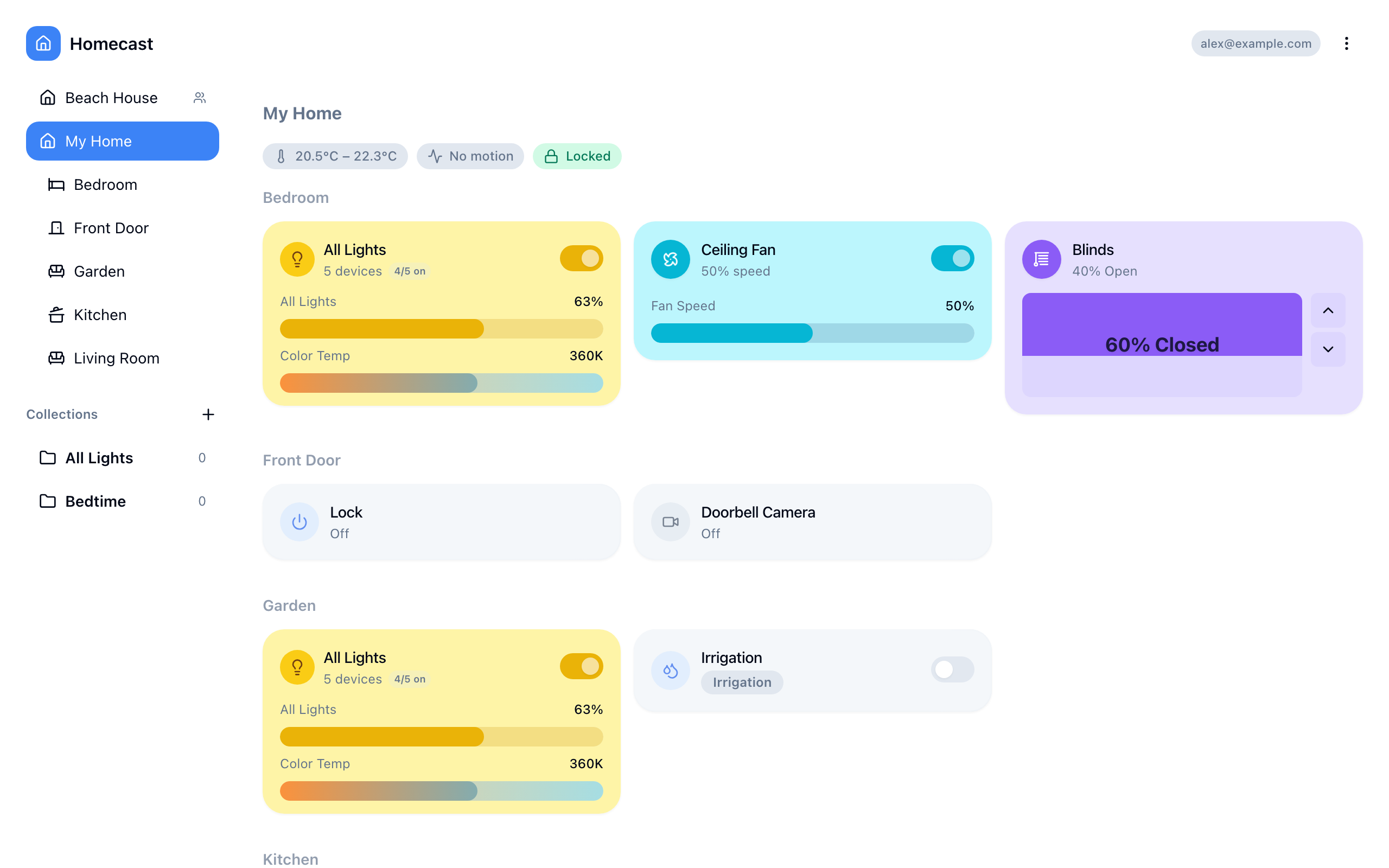
- Once you receive the "your home is ready" email, open homecast.cloud in any browser
- Sign in with your account
- Your homes and devices should appear within a few seconds
- Try toggling a light or checking a sensor value
Devices not appearing?
Make sure your Apple Home Hub is online and the invite has been accepted. See devices not appearing.
Manage your enrollment
View your Cloud Managed status in Settings → Homes. You can:
- Check connection status — see if your home is connected
- Change the invite Apple ID — while setup is still in progress, if you entered the wrong one
- Cancel — removes your home from the cloud relay and stops billing
FAQ
What if my cloud relay goes offline?
Cloud relays are monitored by our team. If a relay goes offline, we'll investigate and restore service. Your devices remain controllable via the Apple Home app during any downtime.
Can I switch to self-hosted?
Yes. Cancel your Cloud Managed enrollment and set up the self-hosted Mac relay instead. Your Homecast account and settings are preserved.
How many homes can I connect?
The number of homes on our cloud relays is limited and subject to fair use; homes you run on your own Mac aren't. If you need more cloud relay homes, email rob@homecast.cloud and we'll add them when there's room.
Which relay should I choose?
The one we suggest is fine for almost everyone — it's online, close to you, and has the most room. You can pick another from Change when adding your home; relays that are full can't be chosen. If every relay is full you can still continue, and your home goes on the first relay that frees up — we'll email you when it's ready.
Is there a free trial?
Not currently. The self-hosted relay is free — Cloud Managed is for users who don't want to run their own Mac.
Can I see my cameras?
Yes. A Cloud Relay shows a still from each camera and video doorbell, and opens to a live view. It is off by default for each home — switch it on in Settings → Homes → home → Cameras. See Cameras.
What's next
- Using the Dashboard — navigate rooms and control devices
- Mobile App — control your home from iOS or Android
- Sharing Access — share with other people